
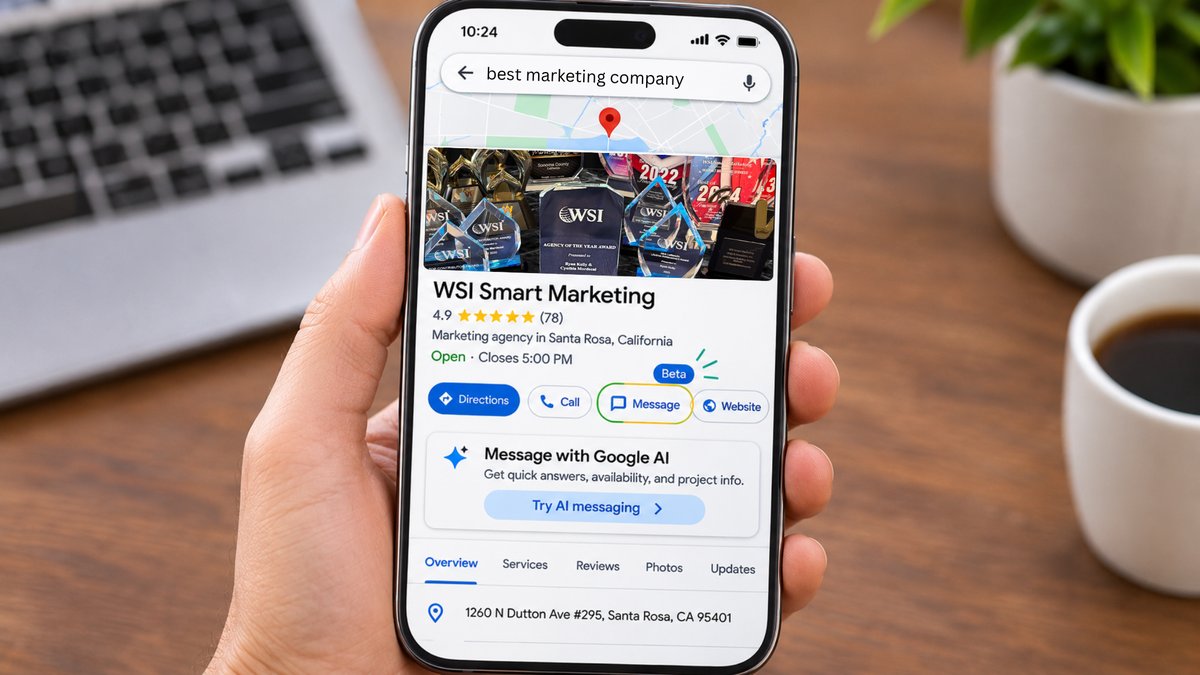
A homeowner finds your listing on Google Maps at 9 p.m. and taps Message. Seconds later, they have an answer about your hours and service area. Nobody on your team typed a word. An AI agent answered, reading straight from your Business Profile.
That’s Google Business Profile AI messaging. Today it’s an early beta, open to a limited group of businesses, with details still moving and no official documentation from Google. The work it asks of you starts before the invitation does, because every answer that agent gives comes straight from your profile. By the end of this post you’ll know what early participants are seeing, what’s still unconfirmed, and what to fix on your profile now.
Key Takeaways
-
Google Business Profile AI messaging is an invite-only early beta, limited to certain business categories and countries.
-
An AI agent answers routine customer questions from your Business Profile and hands complex conversations to you.
-
You can prepare now, before an invitation arrives, by cleaning up your profile data and planning how your team handles handoffs.
-
The profile work is the same whether you join the beta or wait. Clean up your profile data now and decide who handles handed-off conversations.
What Is Google Business Profile AI Messaging?
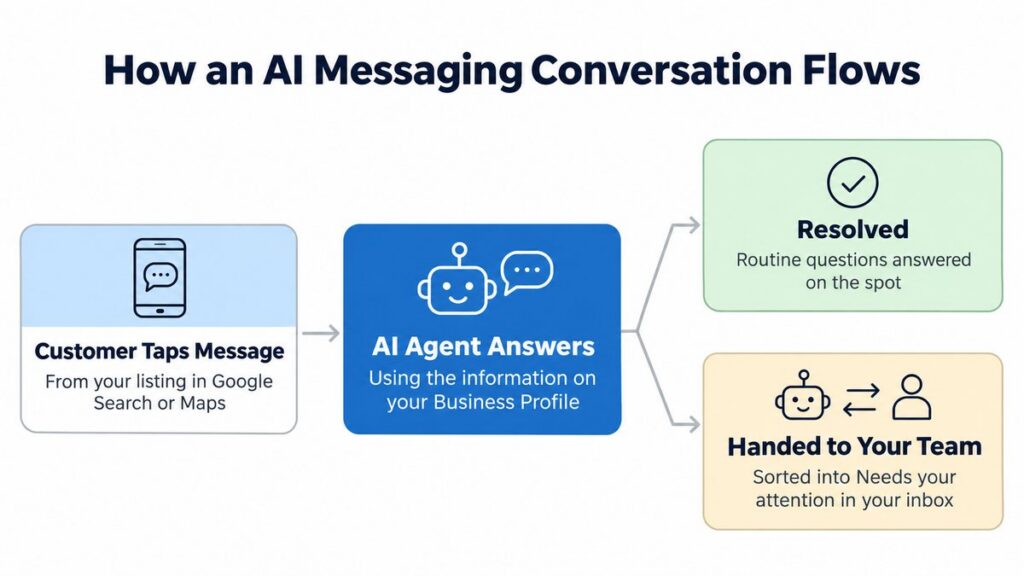
Google Business Profile AI messaging lets customers message your business from Google Search or Maps and continue the conversation in their phone’s own texting app. An AI agent answers first, using the information in your Google Business Profile. When it can’t answer something, it hands the conversation to you.
What the AI Agent Handles
Routine questions:
Hours, location, services, and other details already on your profile
Handoffs:
Passing questions it can’t answer to you and your team
Human takeover:
Letting you step into any conversation at any time
One inbox:
Keeping every conversation inside your Business Profile
Booking help:
Offering reservations, as shown in Google’s restaurant example
It works like a front desk that answers at any hour, using only what you’ve published about your business.
That’s useful, but it has a ceiling.
The limitation of AI messaging on its own: the agent knows exactly what your profile knows, and nothing more. Outdated hours or a missing service turn into wrong answers, delivered in your name.
What Early Beta Status Means for Your Timeline
Google shut down its original Business Profile chat feature on July 31, 2024. Search Engine Roundtable spotted the new AI version in June 2026. On October 29, it reported that Google is opening the pilot to more businesses, and some owners have received emails offering early access at no cost.
Beta features change. Google can rename buttons, adjust eligibility, add pricing, or pull a feature entirely, as it did with the original chat. Treat everything in this post as a snapshot of what early participants are seeing today.
Whether this version ships, gets renamed, or gets replaced by something similar, what it runs on stays the same: accurate, complete Business Profile data. That part is worth fixing now, and it pays off in Maps and the local 3-Pack whether or not an invitation ever lands.
Get Your Profile Ready Before the Invitation
You don’t need beta access to do the work this feature depends on. Accurate hours, service areas, categories, and services help customers find you in Google Maps today, and they’re exactly what an AI agent will read on your behalf tomorrow.
That review is part of what WSI Smart Marketing’s Google Maps optimization work covers.
Call us at (707) 843-3714 or check out our Google Maps optimization services.
As WSI Smart Marketing’s founder Ryan Kelly puts it:
“AI doesn’t just read words. It reads context. It reads authority.”
The agent inside your Business Profile follows the same rule. It reads your listing and repeats what it finds there, which makes what you publish today the script it uses later.
How a Customer Conversation Works
From the customer’s side, the beta works like this:
-
The customer taps Message on your listing in Google Search or Maps
-
The conversation moves to their phone’s texting app, which works with the AI agent when their phone and carrier support RCS
-
The AI agent answers routine questions using your Business Profile information
-
Complex questions go to you, sorted into a “Needs your attention” group in your inbox
-
You can take over at any time with “Take over and reply manually,” then hand the conversation back with “Resume AI agent”
Customers whose phones or carriers don’t support RCS skip the agent, and their messages arrive on your phone as regular texts. Standard text rates may apply.
How to Activate It When Your Invitation Arrives
Check Eligibility
Look for a Google email inviting you to “Activate your AI agent,” or check Messages in your profile
Start Activation
Click “Activate your AI agent” and follow the on-screen instructions
Complete Business Confirmation
Provide your legal business name, registered address, EIN or personal ID, and Privacy Policy and Terms of Service links
Confirm Your Chat Number
Make sure your Business Profile has a chat phone number entered
Monitor and Respond
Check conversations in Search under Messages, or in the Inbox on Google Business Home
AI-powered messaging runs on your profile data, which is why profile accuracy is the work to do before your invitation shows up.
The Original Chat vs. AI-Powered Messaging: Side by Side
FEATURE | ORIGINAL BUSINESS PROFILE CHAT | AI-POWERED MESSAGING (BETA) |
Status | Shut down July 31, 2024 | Invite-only early beta |
Who answers first | Your team | AI agent, with handoff to your team |
Where customers chat | Inside Google | Their phone’s own texting app |
Handoff controls | You answered every message directly | “Take over and reply manually” and “Resume AI agent” |
What it needs from you | Chat turned on in your profile | An invitation, business confirmation, and a chat phone number |
The Main Takeaway
The AI agent can only be as accurate as your Business Profile. Clean profile data turns this beta into an asset the day your invitation arrives, and it pays off in local search long before that.
Why This Matters More for Service Businesses
Speed wins jobs in the trades. A burst pipe, a dead furnace, or a storm-damaged roof sends a customer to several companies at once, and the first one to respond usually gets the call. An agent that answers at 11 p.m. helps you win the same race that decides the local 3-Pack, provided your profile gives it the right answers.
The risks are specific and fixable. If your profile lists 8 to 5 and you take emergency calls until 9, the agent tells customers you’re closed. An outdated service area can turn away a town you cover. A missing service can lead the agent to tell a customer you don’t offer it.
Professional services carry a different risk. Law firms, accounting practices, and dental or medical offices get fewer routine questions. A prospective client asking about a case, a tax problem, or a symptom needs a person from the first message. Professional conduct and privacy rules may also limit what you can say to prospective clients in writing, so check with your compliance advisor before you turn the feature on.
Is Your Business Profile Ready for an AI Agent?
Most business owners haven’t reviewed their profile line by line in months, and the AI agent will read every line.
Contact WSI Smart Marketing for a free consultation, and we’ll review your profile, website, and directory listings together so they tell customers the same story.
Call us at (707) 843-3714 or check out our Google Maps optimization services.
Should You Turn It On?
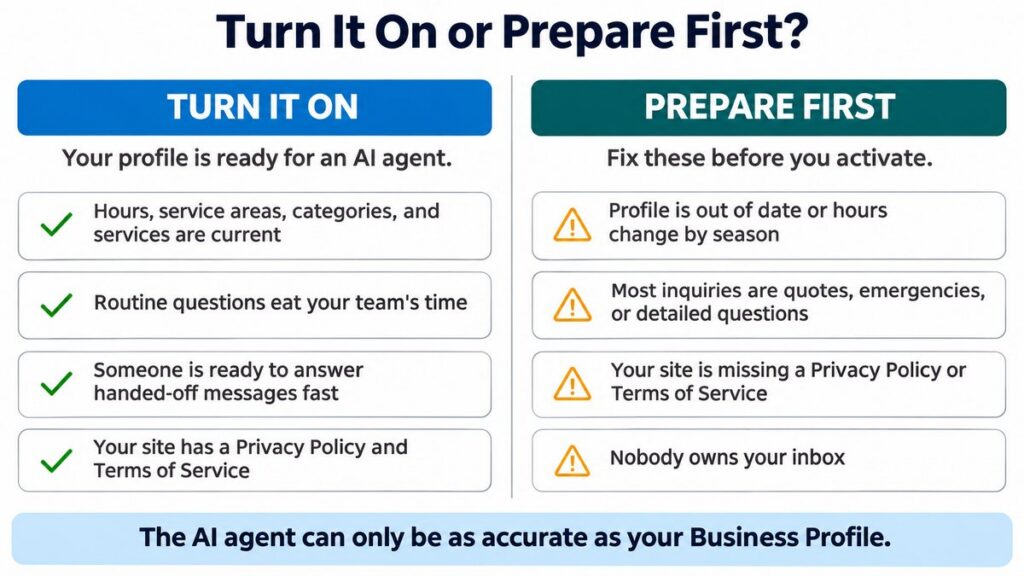
Turn it on when your invitation arrives if:
-
Your profile is current, with accurate hours, service areas, categories, and services
-
You get routine questions that eat your team’s time, like hours, service area, and availability
-
You have someone ready to answer handed-off conversations quickly
-
Your website already has a current Privacy Policy and Terms of Service, which Google requires during confirmation
Hold off and prepare first if:
-
Your profile hasn’t been updated in months, or your hours change by season
-
Most of your inquiries involve quotes, emergencies, or detailed client questions that need a person
-
Your website is missing a Privacy Policy or Terms of Service. California businesses should also review what state law requires those pages to include
-
Nobody owns your inbox, and handed-off messages could sit unanswered
How WSI Smart Marketing Approaches Google Business Profile
Every WSI Smart Marketing strategy treats your Google Business Profile as a core part of local visibility. We keep your profile, your website, and your directory listings consistent, so every channel tells customers the same thing, including any AI agent that answers on your behalf. That same consistency supports your AI search optimization work across ChatGPT, Gemini, and Google AI Overviews.
Google Business Profile Case Studies
Local Retail Store: From Page Two of Maps to the #1 Spot
The challenge: A local retail store in Santa Rosa, CA, ranked 8th to 10th on Google Maps for its most valuable search terms. That put it outside the local 3-Pack, where most customers choose who to call or visit.
What we did:
Profile Rebuild
We refined the store’s categories, services, and products so Google knows exactly what it sells.
Listing Cleanup
We corrected the store’s name, address, and phone number across every directory for one consistent picture.
Active Posting
We published regular updates on new arrivals, promotions, and events to keep the listing fresh.
Website Alignment
We matched the store’s website to its Business Profile so both channels reinforce the same local signals.
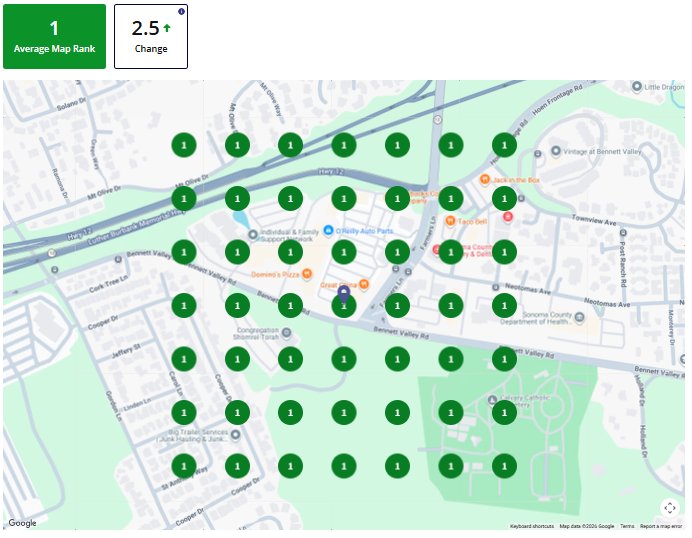
The results: The store moved into the top 3 for its tracked search terms and now holds the #1 position most often.
900%
increase in phone calls
1,130%
increase in direction requests
480%
increase in store visits
A profile that ranks first gets read first. That’s the same profile an AI agent will use to answer your customers.
Make Sure Your Google Business Profile Gives the Right Answers
Not sure whether your Business Profile would give customers the right answers? That’s exactly what a free consultation is built for.
Reach out to WSI Smart Marketing today, and we’ll review your profile, your website, and your listings, then show you what to fix first.
Related posts you might find helpful:
Frequently Asked Questions
Should I wait for an invitation before doing anything?
No. The agent answers from your Business Profile, so the profile work is the same whether you’re invited next month or next year. Accurate hours, service areas, categories, and services help you in Maps and the local 3-Pack right now, and they decide what the agent says the day you turn it on.
Is Google Business Profile AI messaging available to everyone?
No. It’s an invite-only early beta, limited to certain business categories and countries. Check your email for an invitation and look for the Messages option in your Business Profile.
Does it cost anything?
Google is offering pilot access at no cost. Customers whose phones don’t support RCS reach you by regular text, and standard text rates may apply. Google hasn’t said whether pricing will change after the pilot.
Can the AI agent book service calls or appointments?
Google’s public example shows a restaurant taking reservations. We haven’t seen examples of the agent booking service calls, estimates, or consultations yet, so plan on your team handling those.
What happens if my profile has wrong information?
The agent answers from your profile, so it repeats whatever is there. Outdated hours or service areas become wrong answers to real customers. You should audit your profile now, not the week your invitation arrives.
What is RCS?
RCS (Rich Communication Services) is an upgraded texting standard that supports images and suggested replies. The AI agent only works when the customer’s phone and carrier support it. Everyone else’s messages arrive on your phone as regular texts.
Will turning it on help my local rankings?
There’s no confirmed ranking benefit. Accurate profile information and fast responses still help you win the customers who find you.


Recent Comments